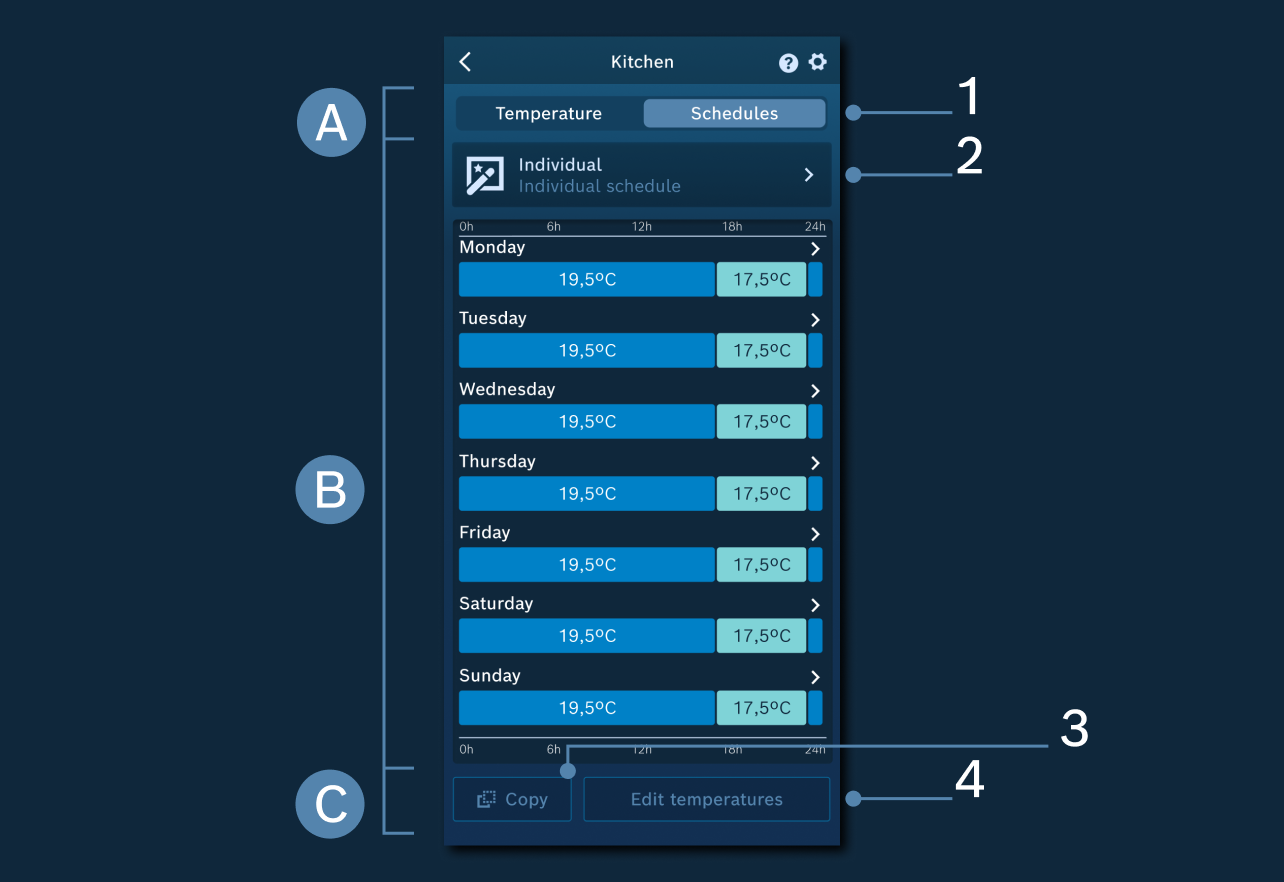
Automatic mode page
In this screen there are 3 main areas of visualization and control of the cooling schedules:
A - Area to switch from Temperature to Schedules page
1. Navigation from Manual temperature settings to Schedules page.
B - Schedule settings area
2. Individual schedules - You can set up and edit a maximum of four individual schedules and one pre-defined schedule.
Examples: Early and late shifts, Working from home, Different seasons.
This area also shows an overview of the currently selected schedule. You can edit any day by tapping on one of the corresponding bars.
You can add and edit multiple time windows with specific setpoint temperatures for every day and also copy to other days.
Please consider:
- Time windows can be defined on a 5-minute basis.
- You can create a maximum of 12 time windows per day.
C - Area for advanced functionalities
3. Copy the current room schedule to other selected/all rooms.
4. Quickly change the current temperature values in the current schedule (across all days).
Related topics: